Technical Specifications
- Installation notes
- Breaking Changes & Known issues
- DataHub v11 compatibility with earlier versions
- DataHub v10 compatibility with earlier versions
- DataHub v9 compatibility with earlier versions
- DataHub v8 compatibility with earlier versions
- DataHub v7 compatibility with earlier versions
- End of Life Notices
- WebView and Silverlight
Supported Operating Systems
Cogent DataHub™ software v11 supports the following operating systems:
| Operating System | Minimum Requirements | |
|---|---|---|
| Windows Server 2008 & R2 | Service Pack 1 (SP1) + .NET 4.6.2 | |
| Windows 7 | Service Pack 1 (SP1) + .NET 4.6.2 | |
| Windows Server 2012 & R2 | .NET 4.6.2 | |
| Windows 8.1 | .NET 4.6.2 | |
| Windows 10 | .NET 4.6.2 | |
| Windows Server 2016 | .NET 4.6.2 | |
| Windows Server 2019 | .NET 4.6.2 | |
| Windows 11 | .NET 4.6.2 | |
| Windows Server 2022 | .NET 4.6.2 | |
| Windows Server 2025 | .NET 4.6.2 |
Cogent DataHub™ software v10 supports the following operating systems:
| Operating System | Minimum Requirements | |
|---|---|---|
| Windows Server 2008 & R2 | Service Pack 1 (SP1) + .NET 4.6.1 | |
| Windows 7 | Service Pack 1 (SP1) + .NET 4.6.1 | |
| Windows Server 2012 & R2 | .NET 4.6.1 | |
| Windows 8.1 | .NET 4.6.1 | |
| Windows 10 | .NET 4.6.1 | |
| Windows Server 2016 | .NET 4.6.1 | |
| Windows Server 2019 | .NET 4.6.1 | |
| Windows 11 | .NET 4.6.1 | |
| Windows Server 2022 | .NET 4.6.1 | |
| Windows Server 2025 | .NET 4.6.1 |
Note: 32-bit DataHub runs on both 32 & 64-bit systems. 64-bit DataHub only runs on 64-bit systems.
DataHub Specifications
- Supports OPC UA and OPC Classic (DA) Server and Client connections.
- Supports OPC UA Data Access, including Discovery, Address spaces, On-demand, Subscriptions, and Events.
- Connects to OPC DA 3.0 servers (and 2.05a servers that support browsing).
- Accepts connections from OPC DA 3.0 or 2.05a clients.
- Connects to OPC A&E servers and clients.
- Supports MQTT client and broker connections
- Supports DDE Server and Client connections.
- Supports live data in a web browser using Silverlight, ASP, AJAX and Java.
- Supports custom TCP/IP connections through Java, .NET and C++ DataHub APIs.
- Supports Windows GUI development through built-in Scripting language.
- Supports ODBC compliant database access.
- Data transmission rates are client dependent, but are typically thousands of points per second.
- Automatic reconnect on a network break and recovery, no intervention required.
- No point list configuration, the DataHub creates points as they are needed.
- Superior publish/subscribe data model, no polling delays and no transmission of static data values.
Security Statements
CVE-2021-44228 (Log4j,Log4Shell vulnerability)
Impact of CVE-2021-44228 (Log4j,Log4Shell vulnerability) on Skkynet and Cogent products and services
There is no Skkynet or Cogent product or service that uses Java, Log4j, Log4Shell, or any derivative of those libraries. This includes Cogent DataHub software, the DataHub API, Skkynet Embedded Toolkit (ETK), the SkkyHub cloud service, the Skkynet DataHub service for Microsoft Azure, and the Vine Add-in for Excel. No Skkynet or Cogent product or service is vulnerable in any way to the exploit described in CVE-2021-44228.
Microsoft DCOM Security Patch KB5004442
Executive Summary
Microsoft security patch KB5004442 disrupts existing OPC Classic communication relying on DCOM by changing the behavior of OPC servers. Mitigation must be performed by the OPC client. If your OPC connections fail after applying this mandatory patch, follow these steps:
- Confirm that the client’s authentication level in the Component Service dialog is set to “Default”, “Packet Integrity” or “Packet Privacy”.
- If the OPC client is a DataHub instance, update your DataHub installation to V9.0.11 or higher.
- Contact other vendors of the OPC client software for an update that addresses this issue.
- If no client update is available, install a DataHub OPC DA Tunneller to eliminate the issues associated with networked DCOM connections, or
- If OPC UA is an option in your system, use OPC UA instead of OPC Classic.
Effect of Microsoft DCOM Security Patch KB5004442
Microsoft has announced that it will release a mandatory security patch to all versions of Windows in Q1 of 2022 that will change the minimum security level for all DCOM connections. This patch will apply to all OPC classic connections (OPC DA, OPC A&E and OPC HDA) over a network. COM communication between processes running on the same computer will not be affected. After you apply this patch to the computer running the OPC server, your networked OPC connections could fail.
The specific change is to the DCOM “Authentication Level” selected by the client when it connects to the server. This screen shot illustrates where this authentication level is configured in the Windows Component Services dialog.
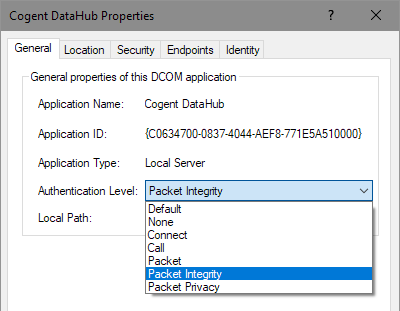
KB5004442 forces all DCOM servers to reject connections that request an authentication level of “None”, “Connect”, “Call” or “Packet”. That is, KB5004442 changes the behavior of OPC servers, and therefore all OPC clients must be reconfigured to operate with the new security limits. Clients must be configured to use an authentication level of “Default”, “Packet Integrity” or “Packet Privacy”.
A DCOM client can explicitly set the authentication level in code, rather than relying on the setting in the Component Services dialog. In this case, changing the settings in the Component Services dialog will not help, as the hard-coded setting in the client will take precedence. If you are using an affected client, you will need to get an update from the client vendor.
Cogent DataHub software uses two different DCOM settings depending on its configuration. In the OPC DA option of the DataHub Properties dialog there is a setting: “Attempt to override application DCOM setting with minimum security settings”.
If this option is NOT selected, the connection will use the authentication level configured through the Component Services dialog. This will normally be set to “Default” and the connection will continue to work. If the “Authentication Level” has been set in the Component Services dialog to a different value, you must set it to one of “Default”, “Packet Integrity” or “Packet Privacy”.
If this option is selected, versions of DataHub prior to 9.0.11 use “Packet” authentication level, and the connection will fail after applying KB5004442. In this case, update your version of the DataHub application to 9.0.11 (or higher) or to version 10. These new versions use “Default” authentication level. Alternatively, you can disable this option in the DataHub OPC DA properties. Disabling this option may require you to change COM permissions on the DataHub application through the Windows Component Services dialog.
If you cannot get an update to an affected client, you will not be able to use it for networked connections. In that case, you can use an OPC tunneller to convert the existing networked connection into a local connection. Contact Skkynet at [email protected], or download a DataHub trial if you want to pursue this option.
If your applications provide the option of using OPC UA instead of OPC Classic, switching to OPC UA will also eliminate DCOM issues. This may require an OPC UA Gateway. Contact Skkynet at [email protected], or download a DataHub trial if you want to pursue this option
Security Updates
13-09-2011 ICS-CERT
13-09-2011 ICS-CERT Security Update Cogent DataHub vulnerability found and fixed
On September 13, 2011, the Industrial Control Systems Cyber Emergency Response Team of the U.S. Department of Homeland Security (ICS-CERT) notified Cogent that version 7 of the Cogent DataHub was vulnerable to denial of service, information leaks, and possible remote code execution by remote hackers. The report recommended that users of the Cogent DataHub minimize network exposure to control system devices, locate control systems behind firewalls, and if remote access is required, to use secure methods such as VPNs. In response to this report, Cogent’s development team has located, fixed, and tested for the vulnerabilities in question, incoporating the fixes in a new release of the Cogent DataHub, version 7.1.2, now available for download. Cogent encourages users of the Cogent DataHub to download and install version 7.1.2 of the Cogent DataHub where possible. Users of the OPC DataHub or Cascade DataHub should contact Cogent to download v6.4.20. Users who cannot upgrade should implement the following guidelines to minimize network exposure of their control systems. There are two classes of vulnerability:
TCP ports 4502/4503 (applies only to Cogent DataHub v7). These are the tunnel/mirror ports. If you are not using these ports, turn them off in the Tunnel/Mirror properties of the DataHub. If you are using these ports, the vulnerability cannot be exploited as long as you require authentication on all TCP connections. To do so, in the Security properties of the DataHub you should remove all permissions for the special UserNames “TCP” and “Mirror”, create a group for users who are authorized, and allow “BasicConnectivity” for that group. The DataHub will then refuse all commands from unauthenticated TCP connections, and still allow authenticated users to connect.
Web server, typically port 80 (applies to Cogent DataHub v7, as well as OPC DataHub and Cascade DataHub v6). If you are not using the DataHub Web Server, turn it off in the Web Server properties. If you are using the DataHub Web Server and exposing it to the Internet, you can configure user and password authentication in the DataHub Web Server. This will force all web browser connections to the Web Server to authenticate. This will be less convenient for your users, and may slow down page loading, but will block attackers from exploiting any of the listed vulnerabilities.
In both cases, if you are not intending for people to connect to the DataHub from the Internet, block ports 4502, 4503, 80 and 943 at your firewall, and only allow connections on these ports from within your local area network. In summary, if you cannot upgrade, all of these exploits can be blocked by security configuration in the DataHub, and further protected against through firewall configuration. If you are running any version of the DataHub in an untrusted environment, you should upgrade to Cogent DataHub v7.1.2, or OPC DataHub v6.4.20 or Cascade DataHub v6.4.20.
05-04-2013 ICS-CERT
05-04-2013 ICS-CERT Security Update Cogent DataHub vulnerability found and fixed
On April 5, 2013, the Industrial Control Systems Cyber Emergency Response Team of the U.S. Department of Homeland Security (ICS-CERT) issued an advisory regarding several vulnerabilities found in version 7.2.2 of the Cogent DataHub and related software. As reported in this advisory, Cogent’s development team has located, fixed, and tested for the vulnerabilities in question, incorporating the fixes in new releases of the Cogent DataHub, QuickTrend, OPC DataHub, and Cascade DataHub for Windows. These new versions are currently available for download. In brief, the vulnerabilities include:
- A malformed expression or random data sent to the Cogent DataHub via TCP could cause it to crash, due to improper input validation or exception handling.
- An attempt to send an HTTP request with an unusually long header to the DataHub Web Server could result in a buffer overflow and Cogent DataHub crash.
- DataSim and DataPid could crash if connected to a server other than the Cogent DataHub. This is not deemed a risk as these programs are not used in production systems.
The advisory included the following mitigation strategies recommended by Cogent:
- Turn off Ports 4502/TCP and 4503/TCP if they are not being used. This can be done in the Tunnel/Mirror properties of the Cogent DataHub.
If access to the application from the Internet is not required, block Ports 4502/TCP and 4503/TCP at your firewall, and only allow connections on these ports from within your local area network. - If the DataHub Web server is not being used, turn it off in the Web server properties.
- If access to DataHub from the Internet is not required, block Port 80/TCP at your firewall, and only allow connections on this port from within your local area network.
- These vulnerabilities are fixed in the following software versions. You can download and install one of these more recent versions.
- Cogent DataHub Version 7.3.0
- DataHub QuickTrend Version 7.3.0
- OPC DataHub Version 6.4.22
- Cascade DataHub for Windows Version 6.4.22
The advisory also encouraged users of the Cogent DataHub to take the following additional security measures, which make sense for almost any industrial application:
- Minimize network exposure for all control system devices. Critical devices should not directly face the Internet.
- Locate control system networks and remote devices behind firewalls, and isolate them from the business network.
- When remote access is required, use secure methods, such as Virtual Private Networks (VPNs), recognizing that VPN is only as secure as the connected devices.
12-07-2013 ZDI-CAN-1915
12-07-2013 ZDI-CAN-1915 Security Update – Cogent DataHub vulnerability found and fixed
On June 25, 2013, the TippingPoint Zero Day Initiative (ZDI) notified Cogent of an upcoming advisory of a vulnerability found in version 7.3.0 of the Cogent DataHub. This vulnerability is not present in any other released version of the Cogent DataHub. Cogent’s development team has located, fixed, and tested for the vulnerability in question, incorporating the fix in new releases of the Cogent DataHub, now available for download. For more information, see the ZDI advisory ZDI-CAN-1915 at www.zerodayinitiative.com. Anybody running Cogent DataHub version 7.3.0 or any beta version of 7.3.1 should upgrade to the version 7.3.1 release on Cogent’s web site as soon as possible. The new version can be installed directly over an existing installation, and all configuration and licenses will be preserved. Cogent thanks Andrea Micalizzi and HP’s Zero Day Initiative for responsibly disclosing this vulnerability.
27-10-2015 ZDI-CAN-2981
27-10-2015 ZDI-CAN-2981 Security Update Cogent DataHub vulnerability found and fixed
As part of our ongoing commitment to security, Cogent has released a new version of the Cogent DataHub, bringing our software installations up to OpenSSL version 1.0.2d. This fixes 7 vulnerabilities in the OpenSSL libraries since version 1.0.2a, which is the previous SSL version to ship with the Cogent DataHub. In addition, we have fixed a critical vulnerability in the Cogent DataHub, known as ICS-VU-780001 or ZDI-CAN-2981, that could facilitate remote code execution via the DataHub’s built-in web server. We strongly recommend that you upgrade to version 7.3.9 (or later) of the Cogent DataHub if either of these conditions is true in your installation:
- You have configured the DataHub web server or DataHub tunnelling to accept connections over SSL. By default the DataHub is configured to accept SSL tunnelling connections on port 4503.
- You are exposing the DataHub web server or tunnelling ports to an untrusted network, such as the Internet.
To upgrade, if you are running any version of Cogent DataHub version 7, or if you are on our Support and Maintenance Plan, you may download and use the latest version from our web site. If you are running earlier versions of the DataHub, such as OPC DataHub version 6.4 or earlier, please contact Cogent to discuss options for upgrading. If you have any questions or concerns, please contact us.
08-04-2016 ICS-CERT
08-04-2016 ICS-CERT Security Update Cogent DataHub vulnerability found and fixed


